
CRM Pipeline: Track Cold Outreach from New to Won
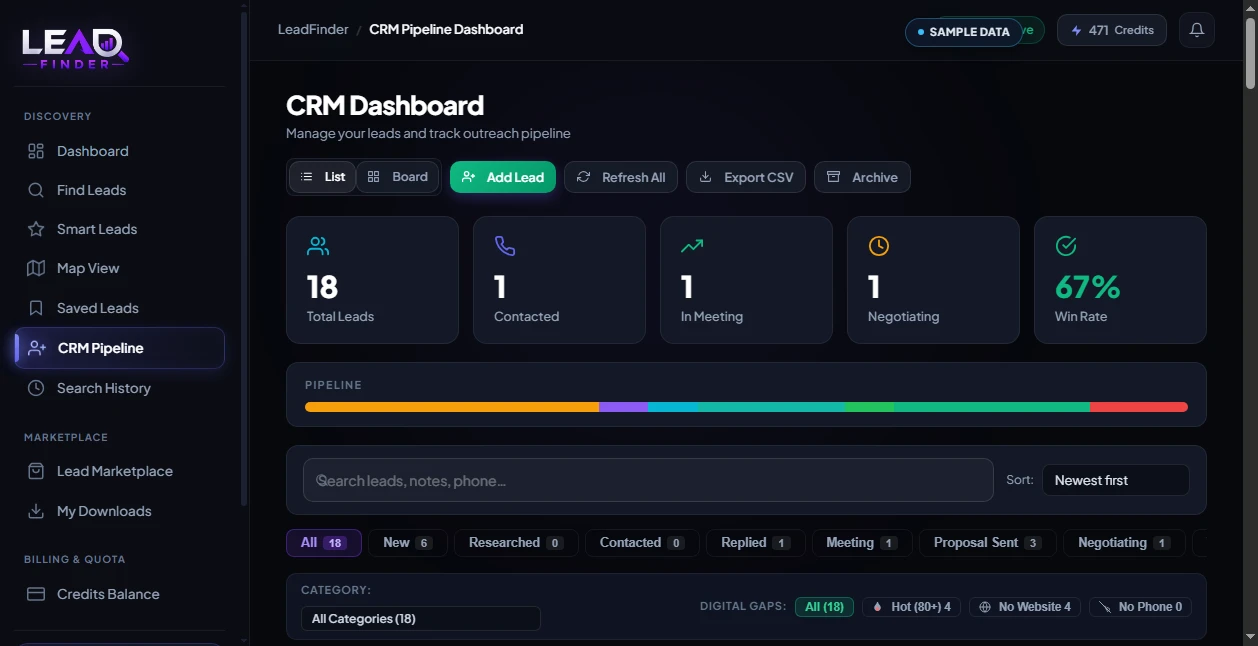
LeadFinder's CRM Pipeline is an integrated outreach dashboard that tracks prospective clients across eight clear stages: New, Researched, Contacted, Replied, Meeting, Proposal Sent, Negotiating, and Won. Switch seamlessly between responsive list and board views, assign notes, track hot/warm conversion scores, and export organized deals to CSV with zero monthly subscription fees.
Stop Losing Hot Leads in Messy Spreadsheet Rows
Most sales freelancers and small agencies begin outreach by scraping leads into Google Sheets. Within two weeks, status columns become outdated, follow-up dates get forgotten, and valuable conversations slip through the cracks. Meanwhile, enterprise CRMs cost $50 to $120 per user every month and require days of cumbersome setup.
LeadFinder eliminates this complexity with a native, built-in CRM Pipeline. Any lead discovered in standard search, Smart Leads, or Map View can be saved directly to your pipeline with one click. You can monitor deal velocity, record call notes, and keep every prospect organized until the contract is won.
The 8-Stage Cold Outreach Workflow
New
Freshly scraped prospects saved from search results or map radar.
Researched
Decision-maker identified, social profile verified, and audit notes added.
Contacted
First touchpoint initiated via phone call, WhatsApp intro, or cold email.
Replied
Prospect responded with interest or asked for additional information.
Meeting
Discovery call, Zoom presentation, or in-person consultation scheduled.
Proposal Sent
Formal quotation, scope of work, or service agreement delivered.
Negotiating
Discussing pricing, revisions, onboarding schedules, and contract terms.
Won
Deal closed! Retainer signed and first invoice successfully processed.
List & Board Views
Toggle freely between high-density data tables and visual multi-column Kanban boards with one click.
Hot/Warm Opportunity Scoring
Algorithms evaluate contact channel density and digital vulnerability to score leads from 0 to 100.
Inline Deal Notes
Add conversation summaries, gatekeeper names, objection notes, and follow-up reminders directly on each card.
One-Click CSV Export
Export your entire pipeline or filtered stages into structured CSV files formatted for team reporting and CRM migrations.
Who Benefits from the CRM Pipeline?
Frequently Asked Questions About CRM Pipeline
Is the CRM Pipeline included for all users?
Yes. The CRM Pipeline is available to all users on every package with zero monthly fees. You only pay for credits to discover and verify new leads. See our Pricing Plans.
Can I view my CRM leads geographically on the map?
Yes! In Map View, toggle the Dataset dropdown to "CRM Pipeline" to plot all of your saved leads across the interactive radar grid.
How are Hot and Warm scores calculated?
Scores are evaluated based on multi-channel contact completeness, identified digital gaps (e.g. absent website or missing SEO metadata), and review ratings to prioritize accounts most likely to convert.
Can I export my pipeline data into Excel or another CRM?
Yes. Click the "Export CSV" button in the CRM header to download an injection-safe CSV file containing all contact records, stage status, and recorded notes.
How many leads can I store in the pipeline?
There are no storage limits on saved leads. You can manage thousands of prospects indefinitely in your pipeline database without recurring storage fees.
Track Your Outreach and Close More Deals
Never lose another sales opportunity. Get 10 free verified credits and organize your sales pipeline immediately.
Get 10 Free Leads →